Thursday, May 21, 2015

Identity Package

I had the chance to design my own Identity Package and i would say some parts were frustrating and other parts were very interesting. I found out how much work actually goes into making your own design. I started off by finding a font and a color palate that i wanted to work with. I chose to go with a bluish color palate because blue is calming and I want people to get a calm feeling from my designs. I then looked for a font and decided to choose Talking To The Moon. I felt this was a good font because it had a calm relaxed feel to it.


I then took my font and color palate to try out some different designs for my logo. I found that I need a logo with a shape in the background so that it could be more visible on patterns. I also needed a logo that didn't have a shape in the background so that it wouldn't look odd on the plain white background. After designing my logo I made a business card out of it and a letterhead.


Link to Behance:
https://www.behance.net/pposts

Friday, May 1, 2015

Emagine 2015

On April 4th, 2015 I had the amazing opportunity to attend the eMagine Media Festival. I not only got to attend the event, I also got to submit some of my work that I design in my Graphic Design class. Although I didn't win an award I'm happy I still had the opportunity to submit my work. It was very interesting to see all of the different designs people came up with and other media designs like video and animation. Every piece of work that won an award definitely deserved it. It was a fun event to meet up with friends and dress nice.

Scooter's Coffee

     Scooter's Coffee is a very well known coffee business. Everyone knows of them because of their very popular coffee drinks such as the Carmelicious, Candy Bar Lattes, and don't forget the Peanut Butter Power Smoothie. Not only are they known for their outstanding Coffee but also their Smoothies, Handmade Pastries, and their Frozen Yogurt. Scooter's Coffee is an amazing place to go not only if you love coffee but also if you hate coffee. They have an extremely wide variety of drinks and food items for you to choose from. Scooter's is mainly known for their products, but many people don't know about their history as a company.


History

Don and Linda Eckles co-founded Scooter's in 1998. They were very interested in the development of the specialty coffee industry in California, and seeing how the Drive-Thru coffee concept worked. They began brainstorming names for their business and eventually came to the conclusion Scooter's was the best name. One of the daughters of Don and Linda had the nickname "Scooter" and when they put it together with everything else they wanted, "Scooter's Java Express" was the perfect fit. The very first "Scooter's Java Express" opened in Bellevue, Nebraska on April 1st, 1998. 
Don and Linda believed these were the 5 keys to success:
  • Find a great location
  • Stay committed to high quality drinks
  • Speed of service
  • Clean store
  • Serve with a big smile
Sticking to those 5 keys to success, the Eckles began franchising in 2001. To this day Scooter's has expanded to 9 states and has over 100 stores opening and operating.


Logo

In 1998 Scooter's Java Express opened with the logo below. They went for a fun logo that also showed how fast they wanted to get you through the Drive-Thru. So they chose to have a person sitting in a cup of coffee with wheels on the bottom and a sign that says "Scooter's Java Express".
After 5 stores had been built and the business started to kick off, Don and Linda wanted to have a logo that represented coffee more often so they decided to change the logo in 2005.
After a couple years of having the logo above, Don and Linda decided to add frozen yogurt to their business. Adding this to their business caused them to need a new logo. They decided to go with a more generic, modern logo.


Career Opportunities

There are many career opportunities at Scooters. You can be a franchise owner or a barista. They don't usually hire people just to design their logos and such. They like to go out of their business to get fresh ideas. 

Tuesday, March 3, 2015

Hand Drawn Media Style


The ad I chose to try and somewhat replicate to show the trend in hand drawn style was from a record company in Kansas City, Missouri. I love the look of all of the hand drawn graphics rather than the computerized graphics, I feel it grabs your attention a lot faster due to it rarely showing up.


 For my ad I made a flyer for Scooters Coffee that they can send to all of the Franchise owners to inform them about an upcoming meeting. I used the hand drawn style to make the flyer more interesting. I used a sun to somewhat represent coffee because usually people get coffee in the morning. I didn't use all hand drawn elements so that it would give it more contrast.

Tuesday, February 17, 2015

Tutorial

1. Make your star shape

Use the Star tool and hold Shift to make a Star shape (or any shape you want, really) on the artboard. (everything you see here is exact size).

Illustrator Tutorial: How to Make A 3D Vector Vintage Star

2. Extrude your shape

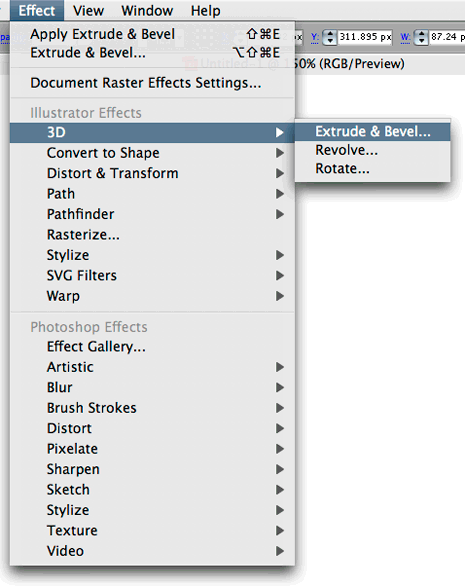
With your Star selected, in the Effect menu go to 3D > Extrude and Bevel.
Illustrator Tutorial: How to Make A 3D Vector Vintage Star

Check the ‘Preview’ option so you can see what you’re working with.

Illustrator Tutorial: How to Make A 3D Vector Vintage Star

Now you should see something like this:

Illustrator Tutorial: How to Make A 3D Vector Vintage Star

Now take the ‘Perspective’ setting all the way to the right (160 degrees)

Illustrator Tutorial: How to Make A 3D Vector Vintage Star


Illustrator Tutorial: How to Make A 3D Vector Vintage Star


Now make your Extrude depth something like 900 or so.

Illustrator Tutorial: How to Make A 3D Vector Vintage Star


Illustrator Tutorial: How to Make A 3D Vector Vintage Star


Click on the blue box and drag to get your desired rotation.

Illustrator Tutorial: How to Make A 3D Vector Vintage Star

Click OK, and you should have something like this:

Illustrator Tutorial: How to Make A 3D Vector Vintage Star

3. Expand Appearance

Now that we have our 3D shape, we will most likely want to have a little more control over it. Go to Object > Expand Appearance and click OK to get rid of the effect and separate our effect into individual shapes that we can edit.

Illustrator Tutorial: How to Make A 3D Vector Vintage Star

You’ll notice that we now have individual shapes for each side of the 3D star shape (and the effect s gone as well, which is good). Great! Now lets make a few more changes.

Illustrator Tutorial: How to Make A 3D Vector Vintage Star

4. Fill the Sides with a Gradient.

To do this, you can either ungroup (about 3 times) until you can select the individual shapes, or you can use the Direct Select Tool (white arrow) to select the individual shapes and fill them with a gradient.

Illustrator Tutorial: How to Make A 3D Vector Vintage Star


Illustrator Tutorial: How to Make A 3D Vector Vintage Star

Do the same for all of the sides.

Illustrator Tutorial: How to Make A 3D Vector Vintage Star


Flat Design

What is Flat Design?

Flat Design is defined by flatness of style: simplifying and interface by removing extra elements such as shadows, bevels, textures, and gradients that create a 3D look. The idea is to create a finished design that only lives in a two-deminsions, without losing any of the functionality that  a "regular" interface provides. Flat Design is a minimalistic design approach that emphasizes usability. It features clean, open space, crisp edges, bright colors and two-dimensional/ flat illustrations. 

History of Flat Design:

Its difficult to determine where exactly the origin of Flat Design came from but we do know what designs inspired it. a design thats had a heavy influence of today's flat Web design can be found in the history of Minimalism. The term " minimalism" is sometimes used interchangeably with today's flat design. Where Flat Design takes its influence from is mainly the design and visual art expressions of minimalism.


My Artwork:


Tuesday, February 10, 2015

Leadership Strengths

     For my 5 leadership strengths I got Empathy, Adaptability, Restorative, Input, and Activator. I have 2 strengths from the relationship group and one from all of the other groups.

Strengths:


  • Empathy means that I can sense the feelings of other people by imagining myself in others lives or others situations.Empathy belongs to the relationship group.This effects me in teams because it makes me want to help people when they're stressed about their part of the project. 
  • Adaptability means that I prefer to "Go with the flow" and i like to take things on as i get them. This is also a part of the Relationship group. This can cause trouble while working in teams because most people like to plan what everyone is going to do on the project and what they're going to do each day but i don't like to follow a schedule. 
  • Restorative means that I'm good at solving problems. This is part of the Executing group. This helps me in team work in case we face a problem that we need to solve i can assist with helping find a resolution to the problem. 
  • Input means that I like to know a lot. I like to achieve lots of information. This is good for teamwork because I will gather all of the information needed to complete the project.  
  • My last strength is Activator, this means that I'm very impatient and like to make things happen. This is good in teamwork because i will make peoples thoughts actually happen although i could rush things.